CV standardisation and candidate scoring

Every CV arrives different. None of them should leave that way.

Word, PDF, two columns, one column, three languages. Somebody still has to read all of them and hold them in their head at the same time.

AI-assisted. The hiring decision stays yours.

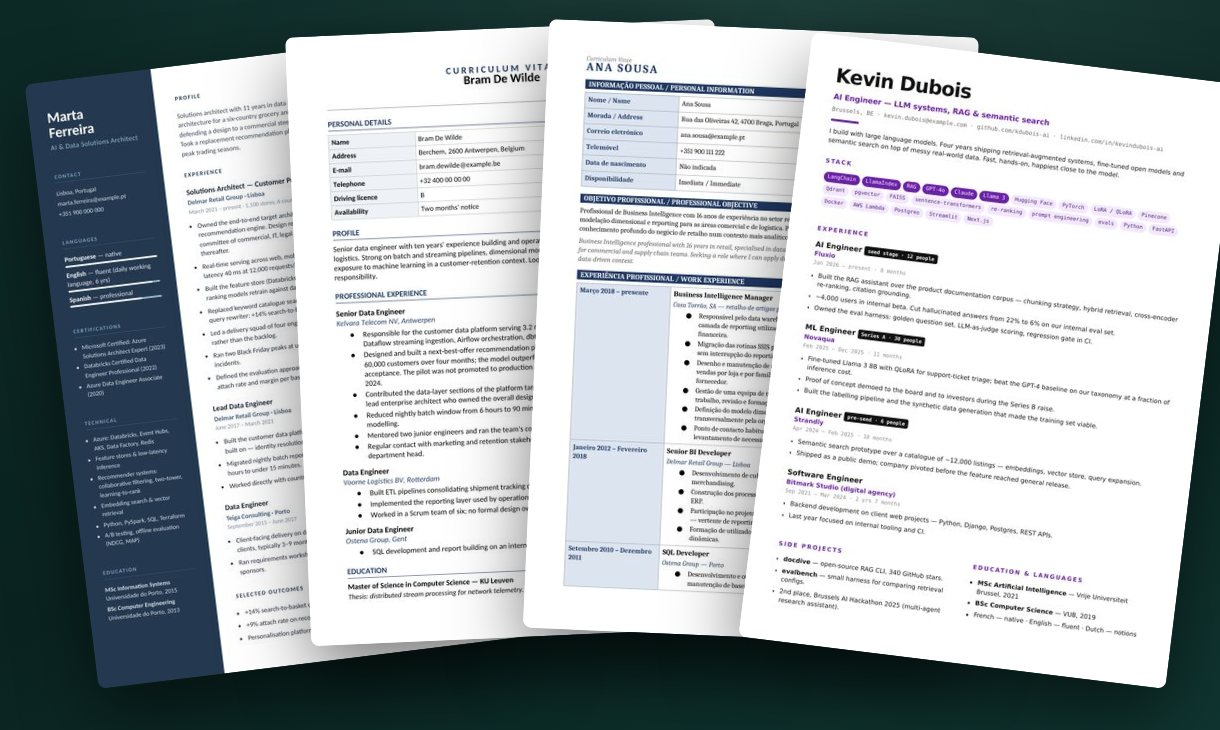
Four incoming CVs fanned out — each in a different layout, format and language

Four candidates · four different CVs

Watch

The whole thing, in under two minutes.

Four CVs in, a ranked shortlist out — the whole workflow, narrated.

1 min 52 English voice-over · captions

ProfileSync

One format. Every time.

Same structure, same order, same typography — carrying your logo and your footer. A hiring manager compares the people instead of the layouts.

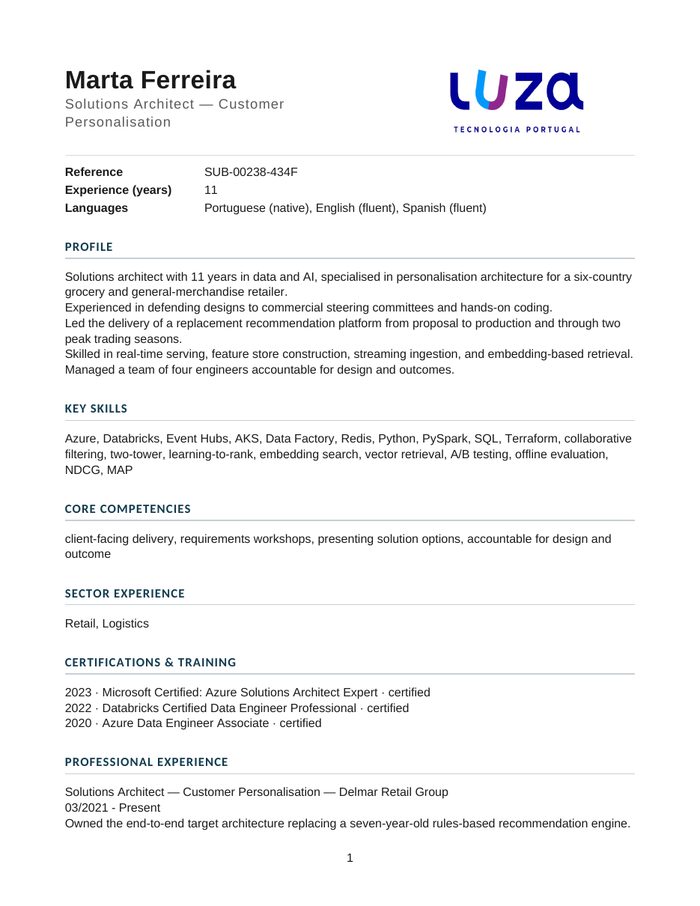
Marta Ferreira's CV rebuilt in the standard template
Marta Ferreira · SUB-00238-434F
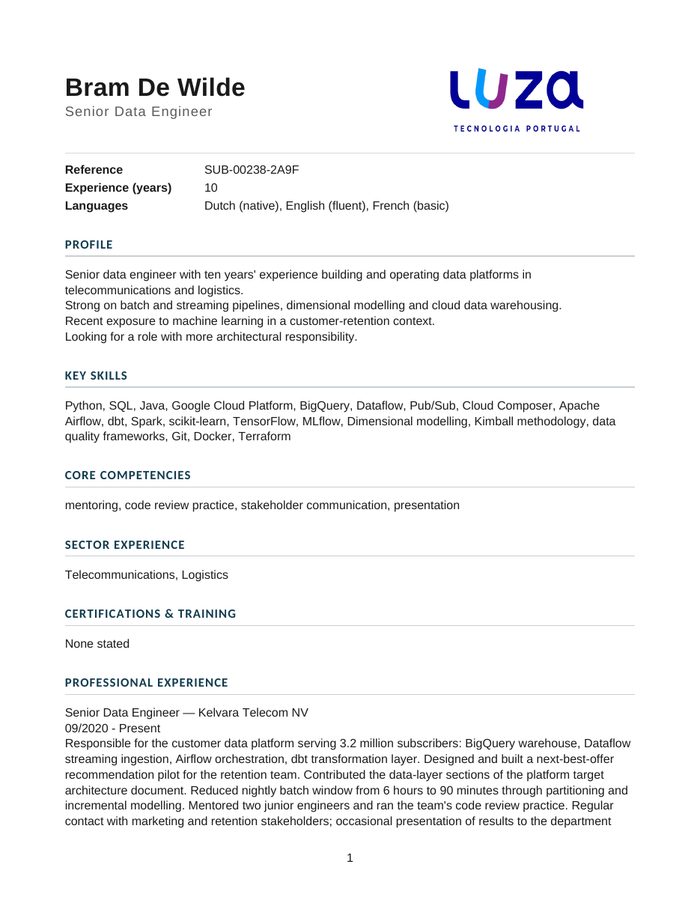
Bram De Wilde's CV rebuilt in the standard template
Bram De Wilde · SUB-00238-2A9F
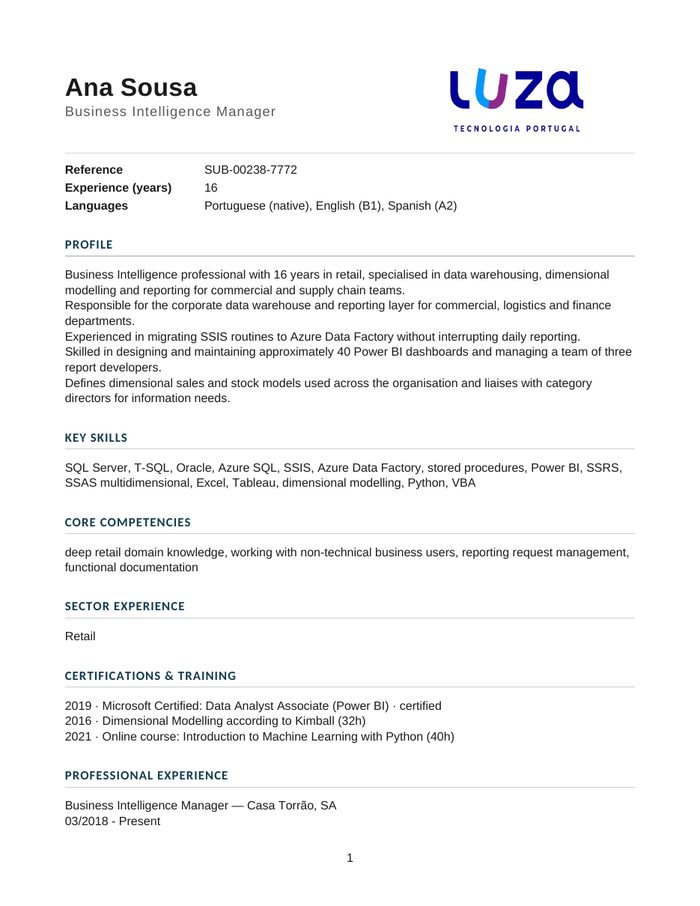
Ana Sousa's CV rebuilt in the standard template
Ana Sousa · SUB-00238-7772
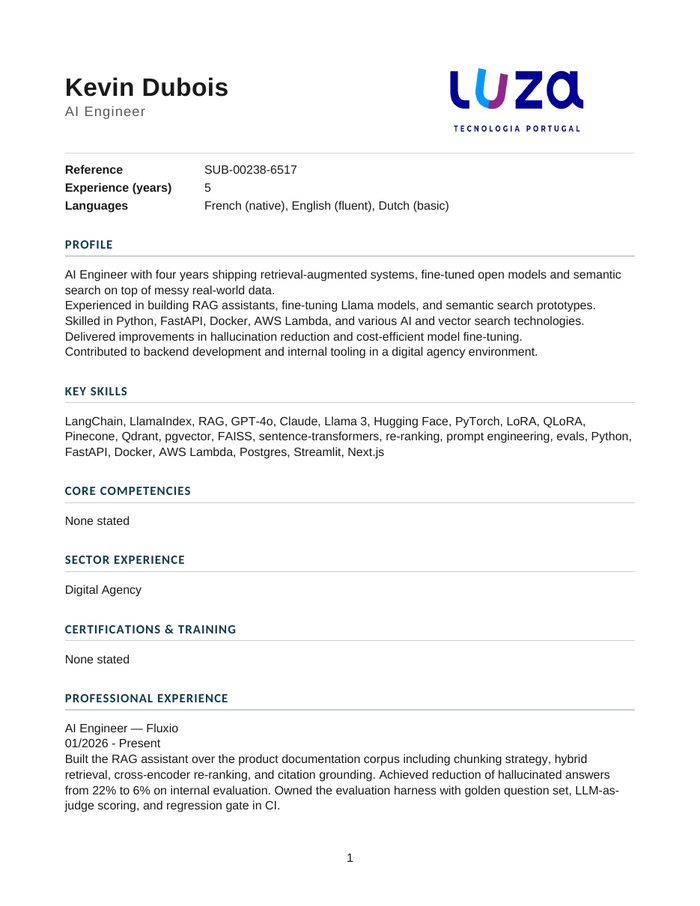
Kevin Dubois's CV rebuilt in the standard template
Kevin Dubois · SUB-00238-6517

The four CVs from the top of this page, rebuilt in one branded structure. Page one of each, as delivered.

Two tools

One standardises. One suggests who to call first.

They solve different problems and share one balance of credits. Most teams start with whichever hurts more, then use both.

ProfileSync

The makeover artist

Turns any incoming CV into one clean, branded template — whatever format and language it arrived in.

  1. Drop CVs into the portal in any format — filenames don't matter
  2. The candidate's name is read from inside the document
  3. You get them back in your template, or the Kandidatos Standard CV
1 credit
Per CV standardised
PDF · Word
Formats in · 20 MB each
25 per batch
Files in one submission

ProfileScore

The HR advisor

Scores a batch of CVs against one vacancy and returns a ranked shortlist with the reasoning behind every point won and lost.

  1. Paste the live role description and add the candidates
  2. Each is scored on five dimensions, weighted the way you set them
  3. You get a ranked shortlist and a report that shows its arithmetic
3 credits
Per CV scored
5 dimensions
You set the weights
−10 max
Mismatch penalty cap
ProfileSync

Four files in. One click.

Any format, any layout, filenames irrelevant — the candidate's name is read from inside the document. Credits are held on submit and charged only when a CV comes back.

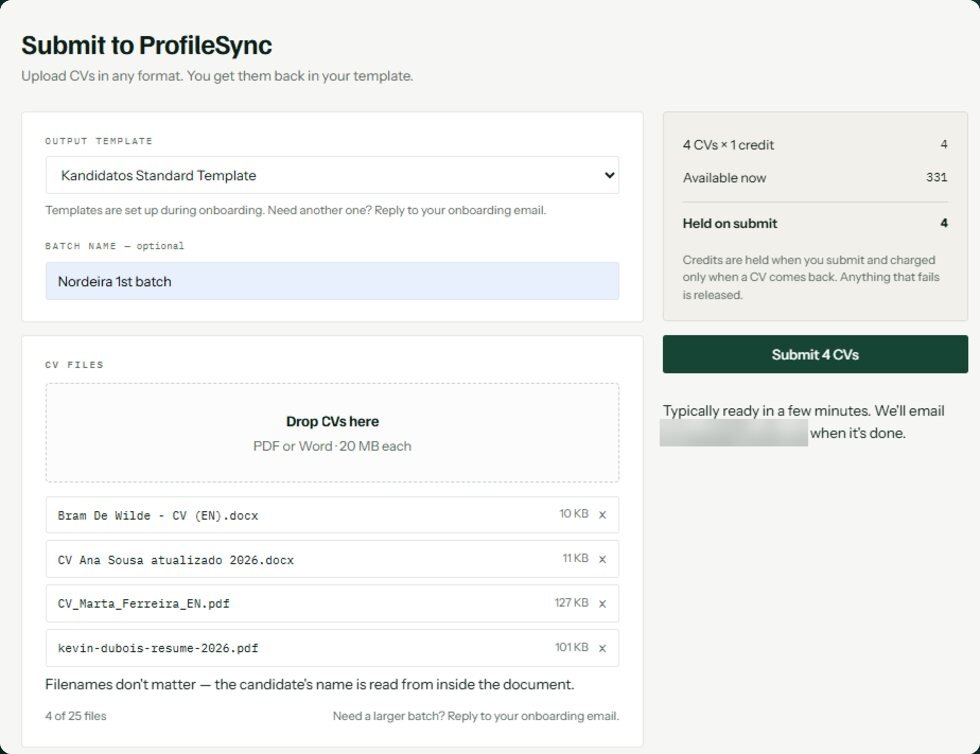
Submit to ProfileSync

Pick the template, name the batch, drop the files.

Four CVs at one credit each. The panel shows what is held before you commit, and anything that fails is released rather than charged.

Typically ready in a few minutes — we email you when it's done.

4 CVs × 1 credit
Held on submit
Nothing to install
Runs in your browser
The Submit to ProfileSync screen: output template, batch name, and four dropped CV files with the credits held on submit
Document branding

Your template. Or ours.

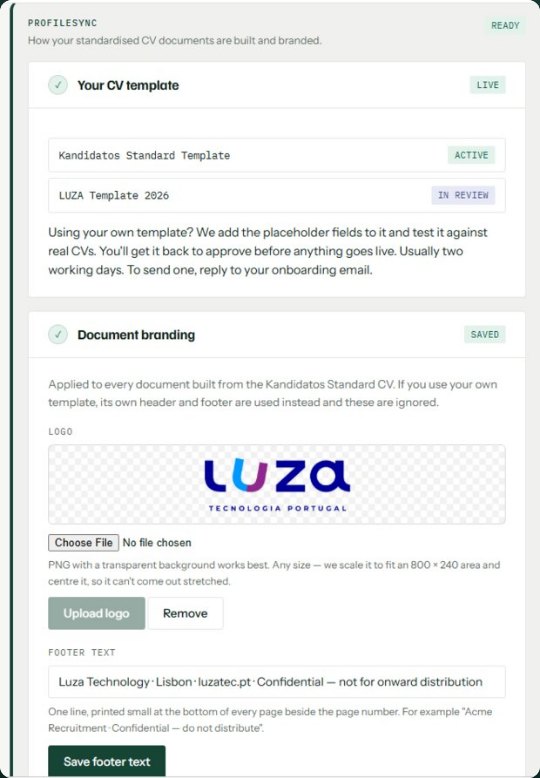
Have your own? We add the placeholder fields and test it against real CVs. You get it back to approve before anything goes live — usually two working days.

Don't have one? Start on the Kandidatos Standard CV, carrying your logo and your footer. Your logo is scaled to fit an 800 × 240 area and centred, so it can't come out stretched.

The document branding panel: active CV template, a client template in review, the uploaded logo and the footer line
Account setup

Six steps. Then it runs.

Delivery, the agreement, your template, your branding, the hiring company, the weights. Set once — and changed whenever a client's vacancy changes.

Two companies, not one

Your account is who you are. The hiring company is who the vacancy is for.

Your account owns the credits and never changes. An agency changes the hiring company whenever it takes on a new client's role.

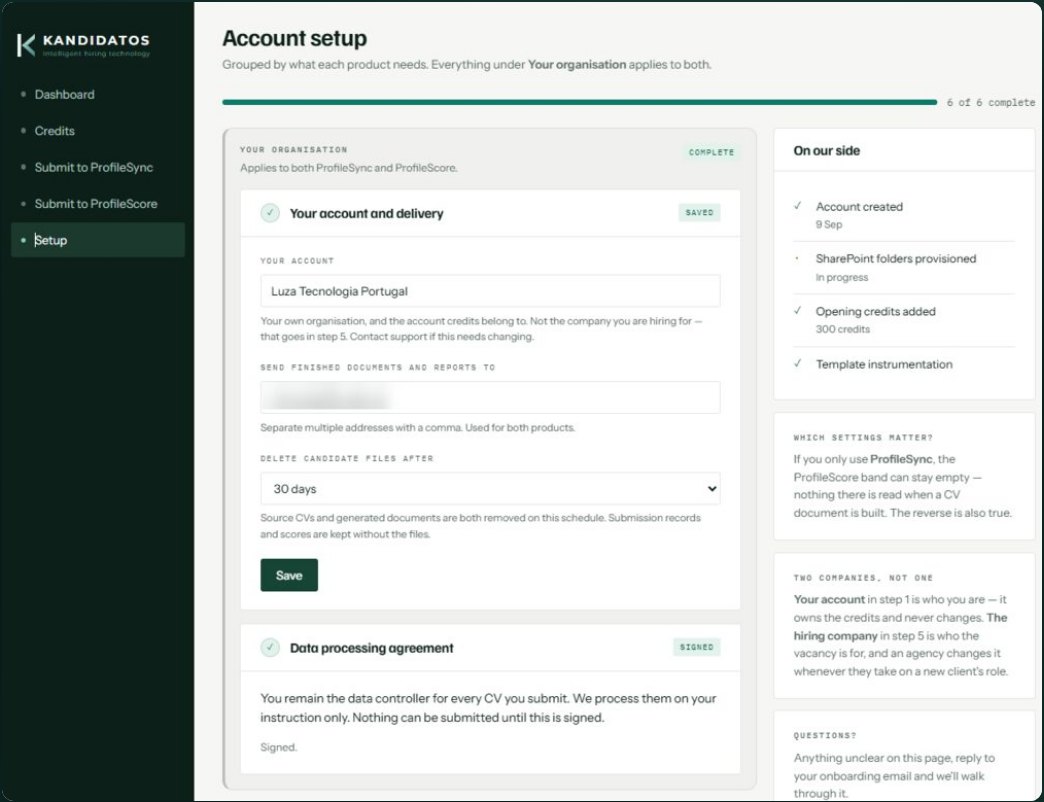
You remain the data controller for every CV you submit. We process them on your instruction only, and nothing can be submitted until the data processing agreement is signed.

30 days
Default file retention · you set it
6 of 6
Steps, then it's done
The account setup page: your organisation, delivery addresses, file retention and the signed data processing agreement

If you only use ProfileSync, the ProfileScore band can stay empty — nothing there is read when a CV document is built. The reverse is also true.

ProfileScore

The vacancy in. A shortlist out.

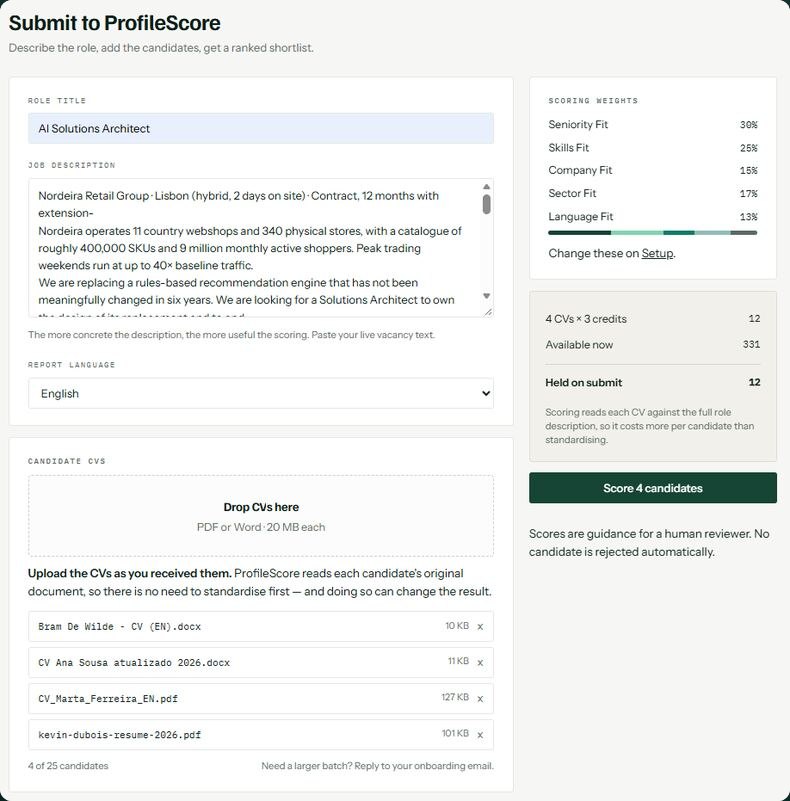
Paste the live role description, add the candidates, pick the report language. Four CVs at three credits each — held on submit, and charged only on what comes back.

Submit to ProfileScore

Upload the CVs as you received them.

ProfileScore reads each candidate's original document, so there is no need to standardise first — and doing so can change the result.

The more concrete the description, the more useful the scoring. Paste your live vacancy text rather than a summary of it.

4 CVs × 3 credits
Held on submit
Report language
Chosen per submission
The Submit to ProfileScore screen: role title, the pasted job description, report language, the four candidate CVs and the scoring weights
The hiring company

Not your company. Their company.

Recruiting on behalf of a client? Describe the client once. The report carries their name — and the company every candidate is measured against is theirs, not yours.

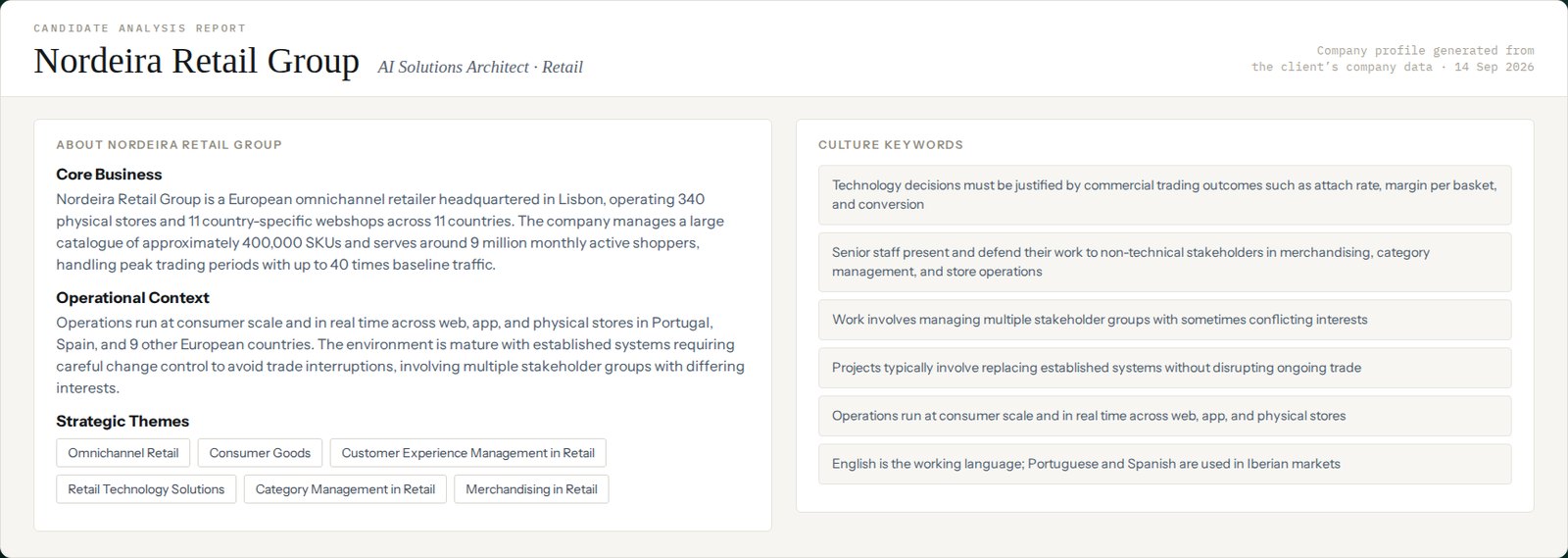
The profile is generated from the client's own company data: core business, operational context, strategic themes and the culture keywords a candidate is read against.

The company profile page of a report: Nordeira Retail Group's core business, operational context, strategic themes and culture keywords

Swipe to see the whole company profile →

The benchmark

What earns points. And what costs them.

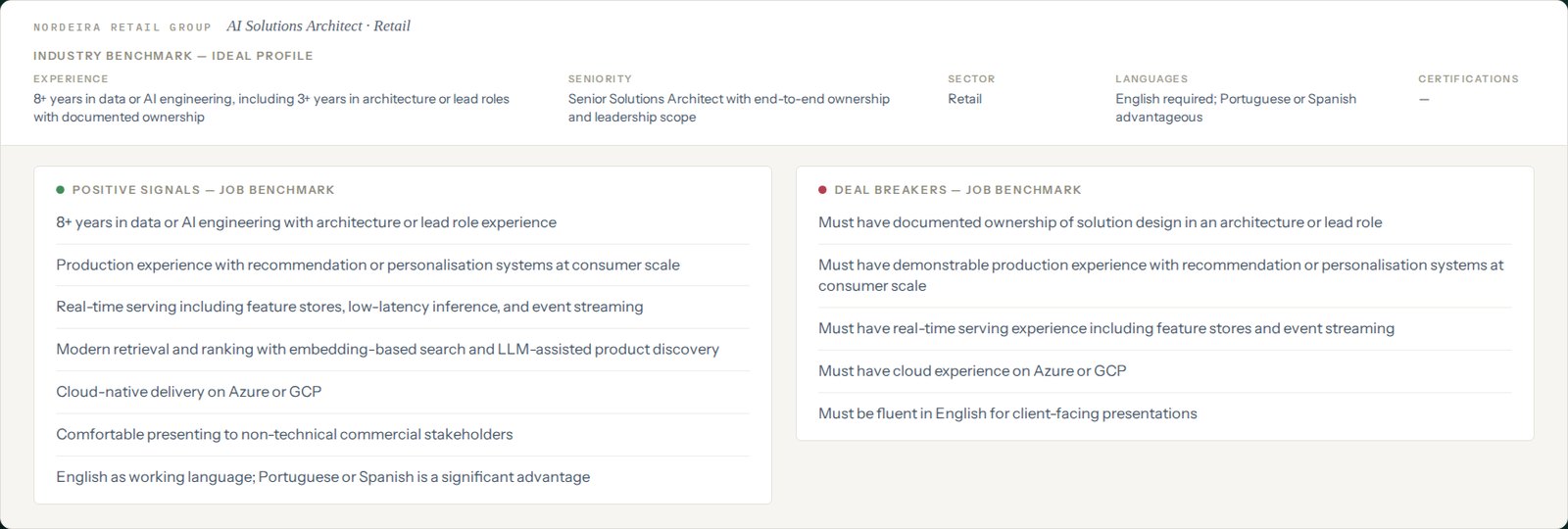
Positive signals lift the component scores. A missing must-have is a mismatch penalty — capped at ten points, and itemised on the candidate's card.

The ideal profile is written out first: the experience, the seniority, the sector, the languages and the certifications a candidate is measured against.

The job benchmark: the ideal profile, seven positive signals and five deal breakers for the role

Swipe to see the full benchmark →

Scoring weights

You decide what matters.

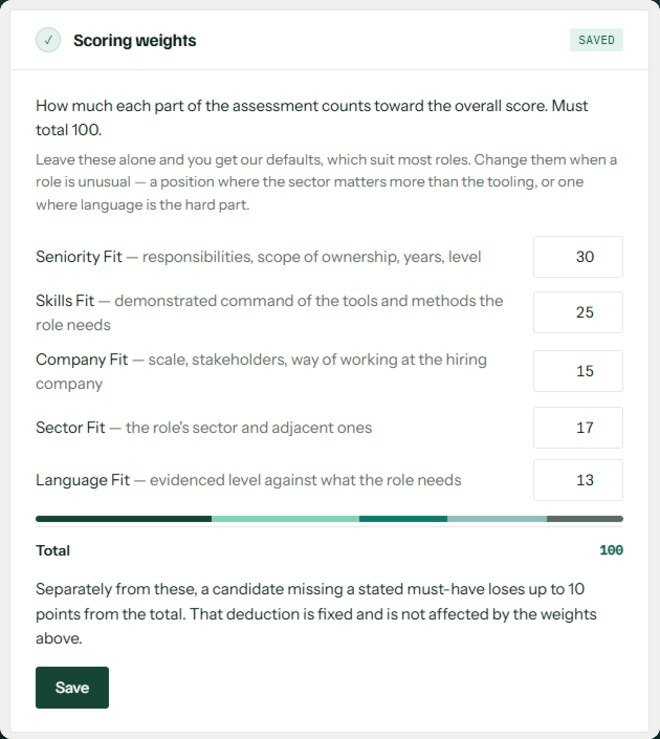
Five dimensions, five weights, totalling 100. Set once, or changed for the next role — everything downstream moves with them.

Leave them alone and you get our defaults, which suit most roles. Change them when a role is unusual — a position where the sector matters more than the tooling, or one where language is the hard part.

−10 points
Mismatch cap · not affected by weights
The scoring weights panel: Seniority 30, Skills 25, Company 15, Sector 17, Language 13, totalling 100
How it works

Use one. Or use both.

The two tools are independent. ProfileSync gives you a clean, branded document to send on; ProfileScore reads the CV as it arrived, and works just as well on a batch you never standardised.

What arrives

Messy CVs

Any format, any language, straight from your inbox.

One credit each

ProfileSync

Every CV rebuilt in one consistent branded structure, ready to send to a hiring manager.

Three credits each

ProfileScore

The original documents scored on five weighted dimensions and ranked.

Always

You decide

A shortlist with reasoning. The call is yours.

Submit the same batch to both, in either order. ProfileScore always reads the candidate's original document, so standardising first is a delivery choice, not a prerequisite.

ProfileScore output

Five scores, and a total that closes.

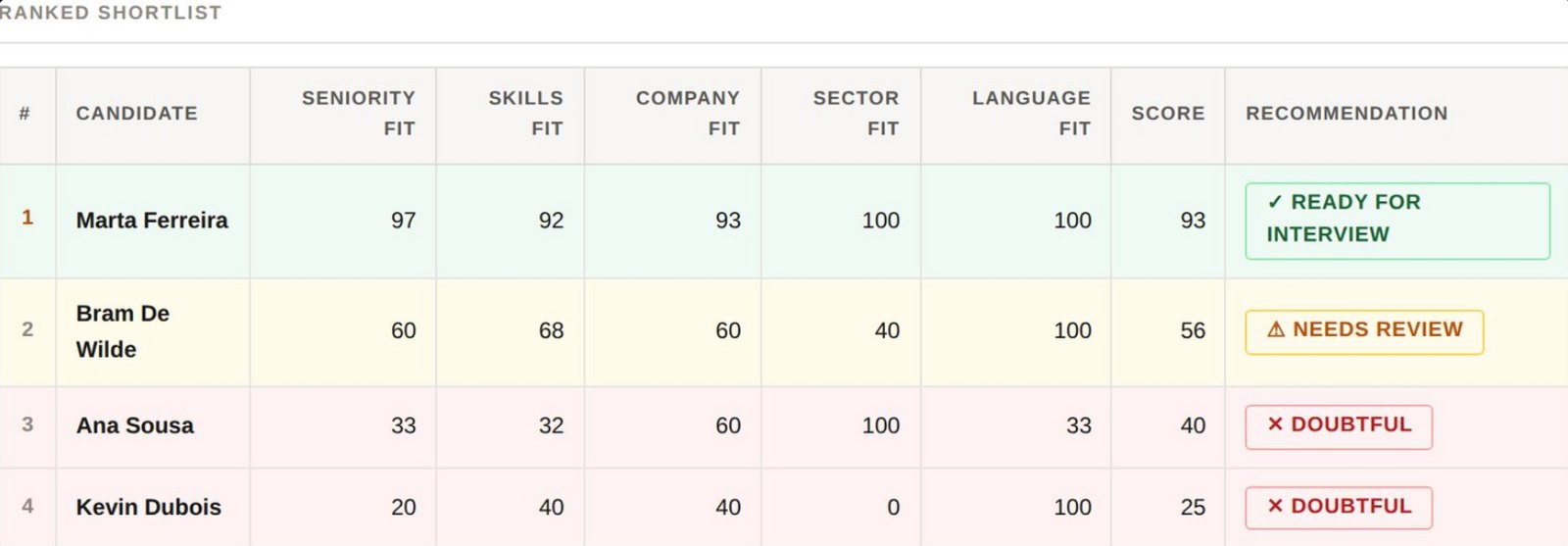
Every dimension the client weighted, printed beside the result. A shortlist you can hand to a hiring manager, or defend to a candidate who asks why.

The ranked shortlist: Marta Ferreira 93 ready for interview, Bram De Wilde 56 needs review, Ana Sousa 40 and Kevin Dubois 25 doubtful

Swipe to see every column →

Submission SUB-00255 · AI Solutions Architect · Nordeira Retail Group · four candidates · Seniority 30% · Skills 25% · Sector 17% · Company 15% · Language 13%

One candidate

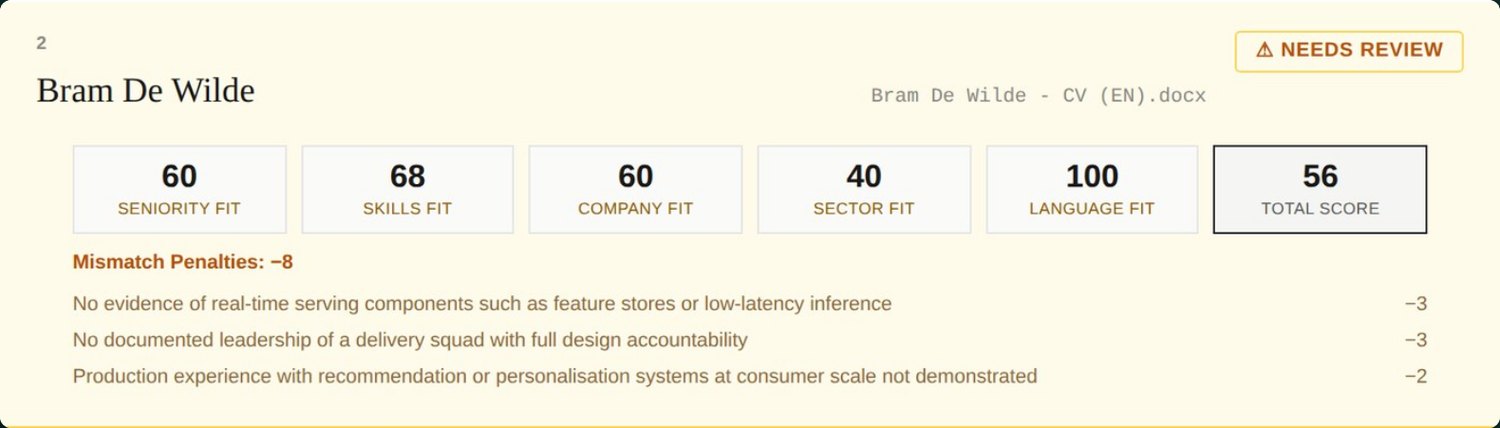
Where points come off, the report says why.

Each line names the requirement that wasn't met, and what it cost. They sum to the deduction — always.

Bram scores 100 on language and 68 on skills, and still lands at 56: three named gaps, eight points, all of them visible.

Bram De Wilde's candidate card: five component scores, a total of 56, and three itemised mismatch penalties totalling minus eight

Swipe to see the whole card →

Nothing you can't explain to the candidate. Each deduction names the requirement that wasn't met and what it cost — here −3, −3 and −2, summing to the −8 on the card.

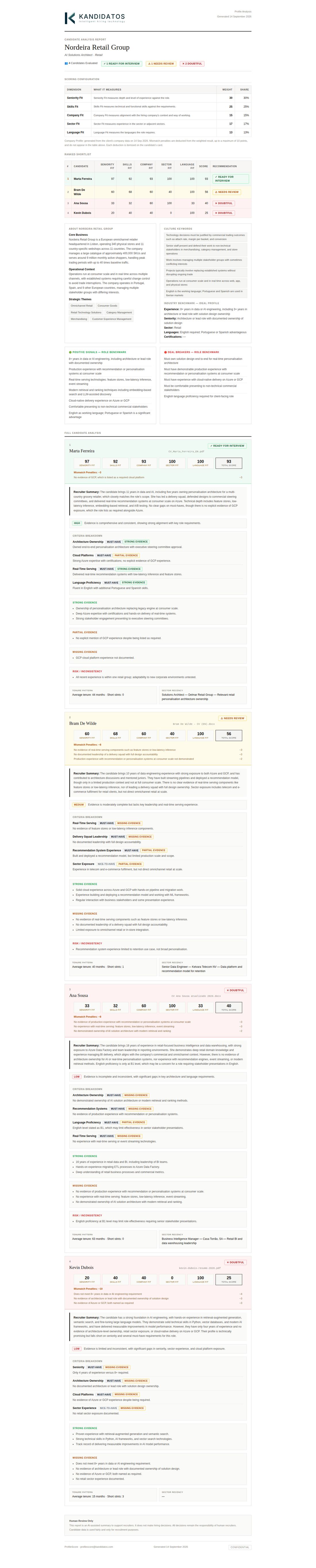
The whole thing

The full report, end to end.

Scroll it here as a hiring manager would receive it — the company profile, the benchmark, the scoring configuration and every candidate card, in one document.

The complete ProfileScore report for submission SUB-00255, from the company profile through to the last candidate card

Scroll inside the frame · report SUB-00255

Scores are guidance for a human reviewer. No candidate is rejected automatically, and nothing is filtered out before you see it.
How we work

Assistance, not authority.

You make every call

Nothing is auto-rejected and no candidate is filtered out before you see them. The tools sort and explain; people decide.

Nothing you can't explain

Every deduction is named and costed on the candidate's card. If a number looks wrong, you can see the line that produced it — and defend it to the candidate who asks.

Built on Microsoft 365

Runs on the platform your IT team already runs. Nothing to install. You set how long candidate data is kept — 30 days by default — and source CVs and generated documents are both removed on that schedule.

You stay the data controller

We process every CV on your instruction only, under a data processing agreement signed during setup. Nothing can be submitted before it is.

Their company, not yours

Recruiting on behalf of a client? Describe the hiring company once. The report carries their name, and every candidate is measured against their context — not yours.

You set what matters

Five dimensions, five weights. Set once, or changed for the next role — and the weights are printed beside the result, so anyone reading it can check the arithmetic.

Your account

You pay per CV.

One credit per CV standardised. Three per CV scored. Nothing to install.

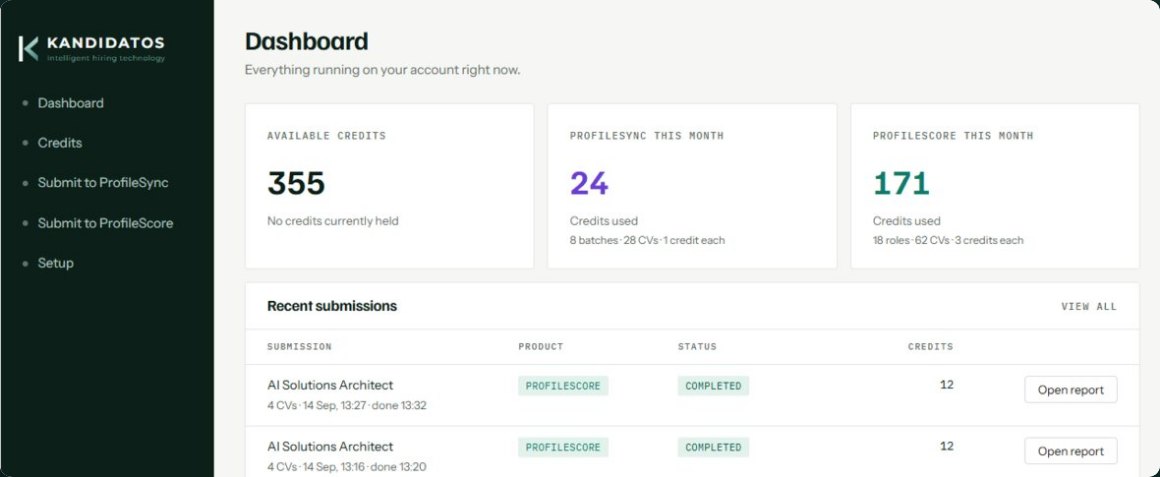
The dashboard

Everything running on your account, on one screen.

The balance, what each product has used this month, and every recent submission with the credits it cost and a link to its report.

Credits are held when you submit and charged only when a CV comes back. A CV that fails is never charged.

The portal dashboard: 355 available credits, ProfileSync and ProfileScore usage this month, and recent completed submissions

Swipe to see the whole dashboard →

Pricing

Buy credits. Spend them per CV.

One credit standardises a CV through ProfileSync. Three credits score one through ProfileScore. Every plan is prepaid — there is no overage and no invoice after the fact.

Starter
€250
300 credits per quarter · €0.83 each
Growth
€450
600 credits per quarter · €0.75 each
Scale
€800
1,200 credits per quarter · €0.67 each
Unused credits
Roll over
Quarter to quarter, without limit
Cost per CV

The figure a recruiter asks for.

Tier ProfileSync ProfileScore
Starter€0.83€2.50
Growth€0.75€2.25
Scale€0.67€2.00
Credits are held when you submit and charged only when a CV comes back. A CV that fails is never charged.
Top-ups

Need more before the quarter turns?

Top-up packs are priced above every tier rate, so moving up a tier always costs less per credit than topping up.

Small
€150
100 credits · €1.50 each
Medium
€400
300 credits · €1.33 each
Large
€750
600 credits · €1.25 each
One balance
Always
Bundle and top-up credits behave the same
Getting started

Two one-off fees, and only one applies to everyone.

Onboarding
€250
Every client · provisioning, the DPA, account setup, a walkthrough and support through your first batch
Template instrumentation
€500
Only if you bring your own Word template · we add the fields, test it against real CVs and run the approval cycle
Start on our template
€500
Onboarding plus a first quarter on Starter
Start on yours
€1,000
Onboarding, instrumentation and a first quarter on Starter

Billed quarterly in advance through Stripe. Credits stay usable while your subscription is active; if it ends, your balance is held for twelve months rather than removed.

Nothing to install. Start with one batch.

Send us three real CVs and your template. We'll show you what comes back — no setup on your side.